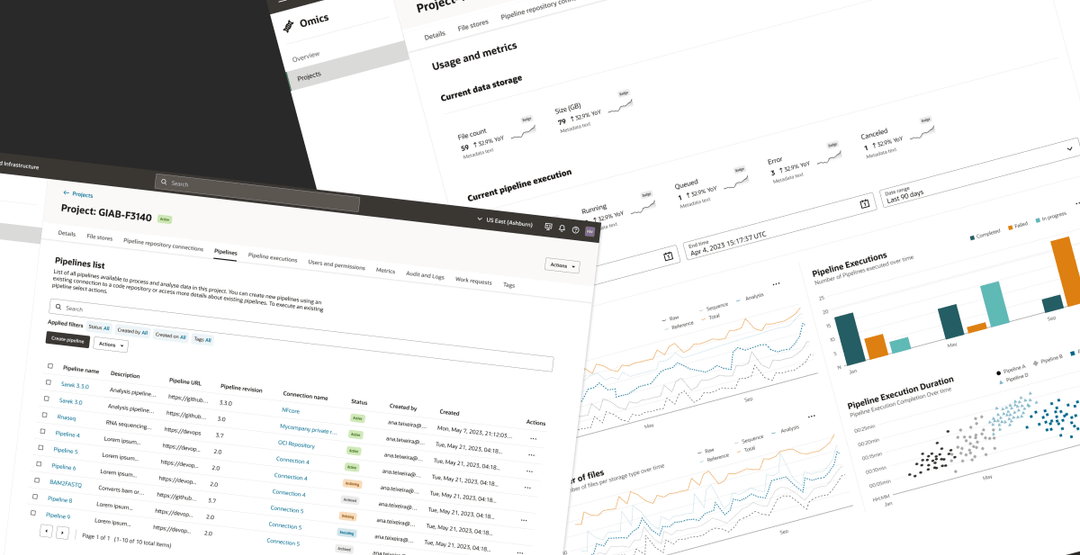
One legible system for pipelines, executions and data.
Task success rate across core pipeline workflows.
Average satisfaction score from platform users.
Unified home for pipelines, executions and data storage.
Project Overview
Project Overview
The user problem
Lab clinicians and researchers in the omics discipline depend on biological data to make diagnoses, build personalized treatment plans, and track viral patterns. But their workflows were fractured: processing data took multiple manual steps, work was scattered across disconnected applications, and teams were left wrangling enormous volumes of unstructured files creating siloed, hard-to-find data and analyses that couldn't easily be reproduced or reused.
The business objective
The goal was to decrease sequencing costs by centralising raw and processed omics files, large-scale analyses, and querying in a single, unified system. By making data structured, reproducible and reusable across teams, the platform would accelerate the translation of precision medicine from lab research into clinical practice, ultimately enabling personalised healthcare with better prevention, earlier diagnosis and more targeted therapy for the patient.
My role and scale of ownership
I owned the design initiative end to end, from inception through handoff to engineering. That meant securing cross-functional buy-in for UX activities, defining the strategy and plan, and personally delivering the core craft govern trade-offs, as well as onboarding and mentoring the designers who joined the project.
How I got from insights to product value
Discover
- Mined customer research and ran a stakeholder kickoff
- Consolidated needs, personas and use cases into an aligned problem statement
- Secured product and engineering buy-in on a UX plan
Define
- Diagrammed the full product proposition to expose how features related
- Translated it into a global information architecture and user flows
- Covered every use case, CRUD operation, and edge case
Design
- Turned constraints into a systemic solution
- Split a broken five-step creation flow into a simple/advanced model
- Built mockups and prototypes
- Codified component behavior in a single source of truth
Deliver
- Evaluated the experience across two usability studies with beta-client domain experts
- Logged every descoped compromise as governed UX debt
- Handed a fully specified system to engineering

Execution
Execution
Building alignment before building screens
I initiated the project by reviewing existing documentation and organizing a kickoff workshop to gather requirements directly from stakeholders. Following this session, I drafted a clear problem statement, consolidated known user needs and pain points from previous customer research, identified key personas, and outlined core use cases and feature requirements.
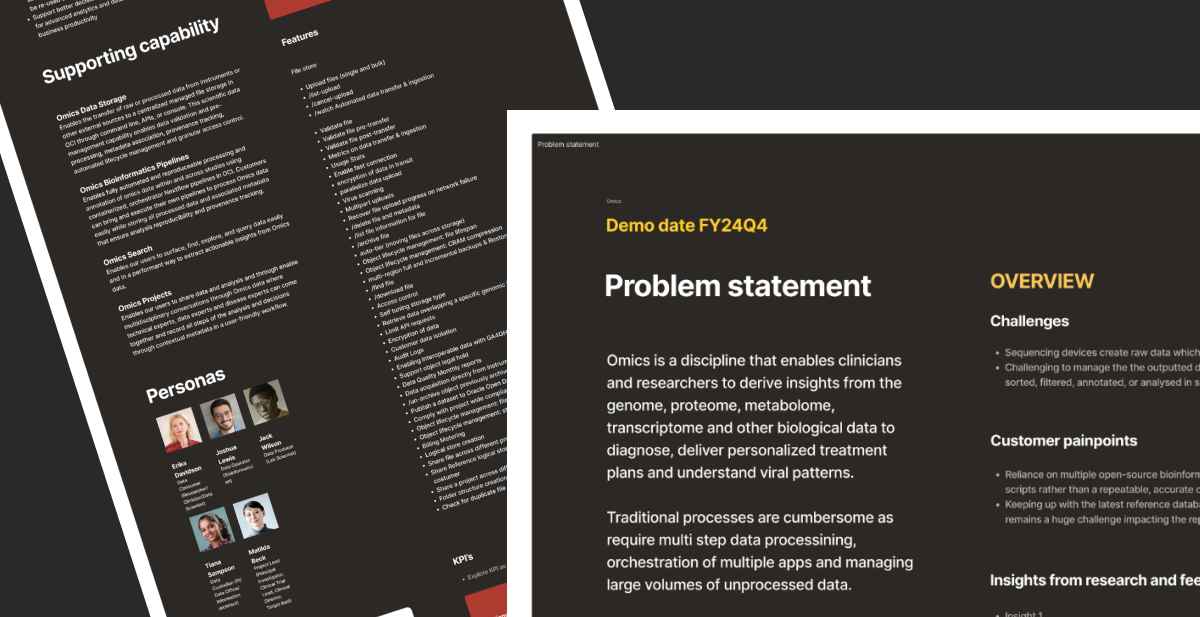
Consolidated problem statement, supporting capabilities, features and personas I defined from the kickoff.
I created an initial UX plan and reviewed it with the product and engineering teams to gain alignment and buy-in on the proposed activities and timelines. The plan outlined a range of key tasks, including finalizing personas for upcoming research, analyzing use cases and scenarios, defining information architecture (IA), mapping user flows, and designing wireframes, mockups, and interactive prototypes. It also included usability testing sessions, iterative design reviews, and the handoff of final components for development and deployment.
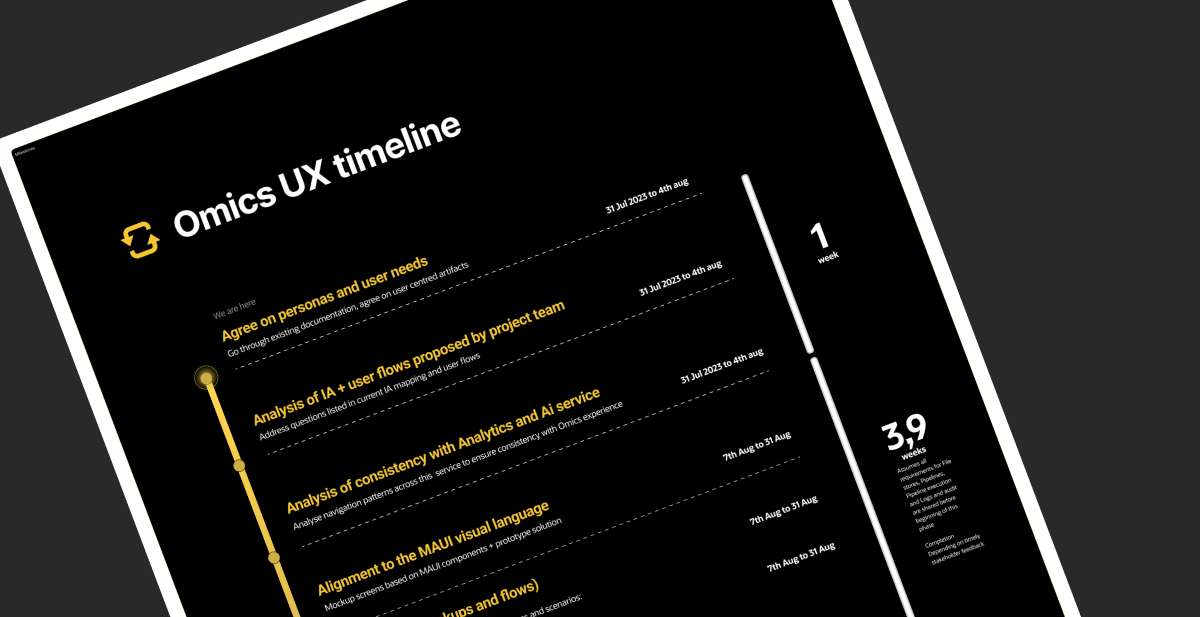
The UX timeline that aligned product and engineering on activities and durations.
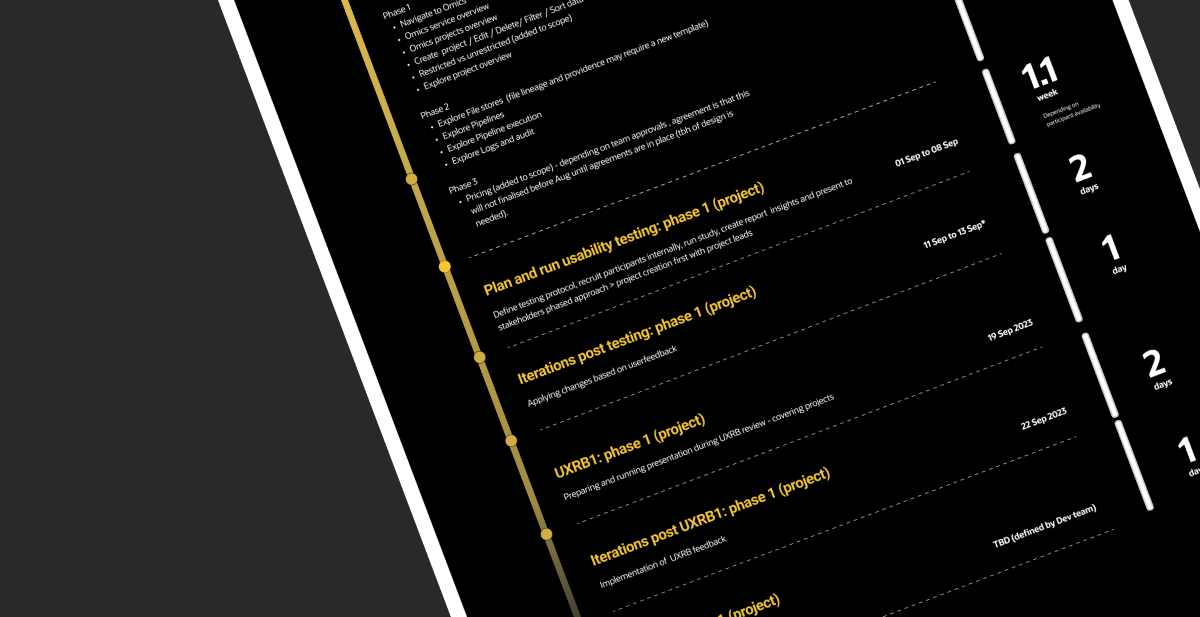
Usability testing, iterations and UXRB review phases mapped across the schedule.
Understanding the product offering
The next step was a follow up workshop to get more granular insights on known user pain points and product goals based on customer research insights. During this workshop we also clarified questions around use cases and co created lists of scenarios based on these use cases and agreed on frequency of recurring calls for next steps of design reviews.
In order to understand the offering, after this session I diagrammed the discussed proposition as it helped me map how these different features were related and informed the next step of defining the information architecture.
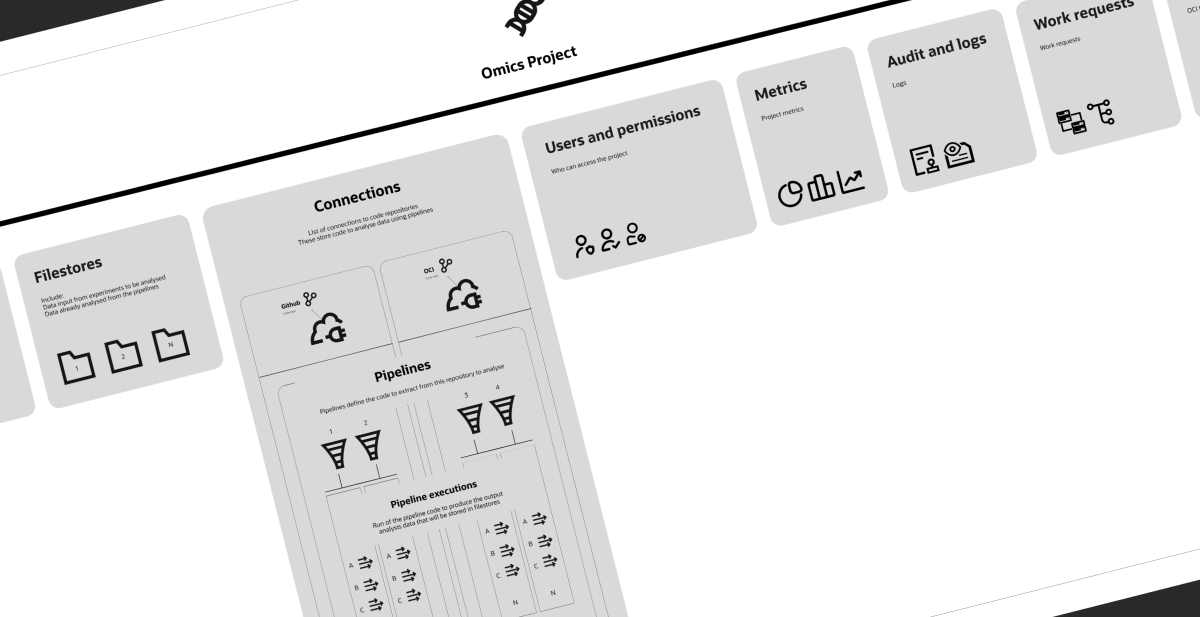
Overview of features and relationships across the omics project, diagrammed to inform the information architecture.
Designing information architecture for a genuinely complex domain
I proposed an initial information architecture and ran online and offline design reviews to ensure all key features were accounted for and structural implications across pages were understood. These sessions surfaced requirements for deep linking and the need to surface data across multiple areas of the platform, such as auditing services spanning multiple features.
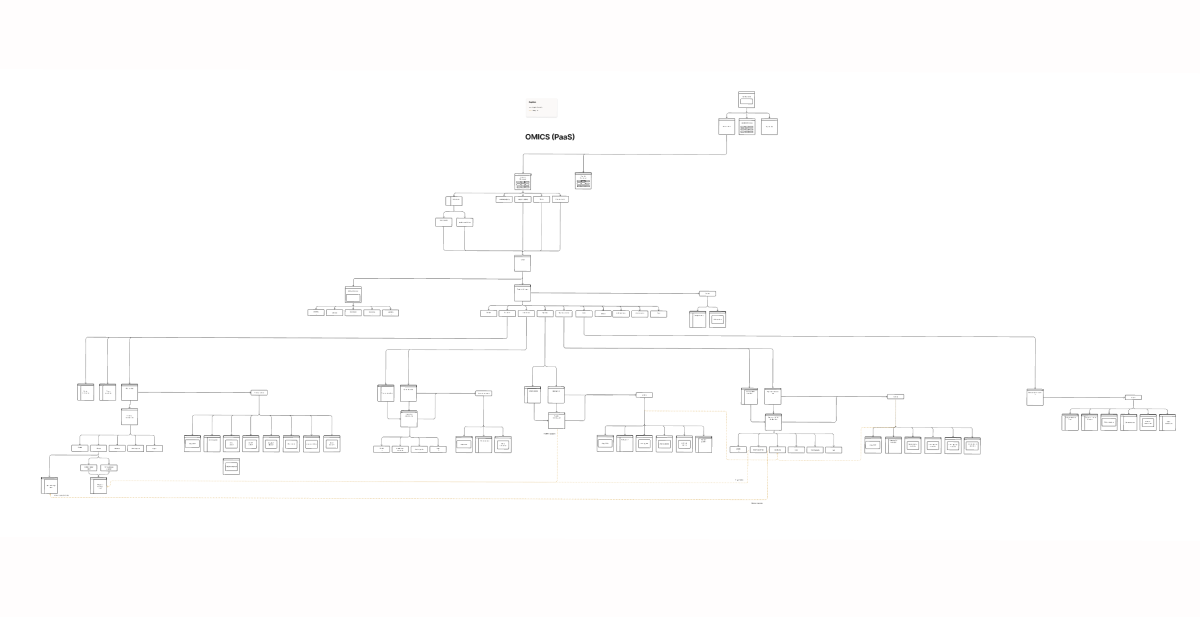
Global information architecture for the OMICS platform, mapping deep-linked filestores, pipelines and connections.
We also discussed variations of the information architecture for several sections of the new product, particularly the project details page. This page required multiple sub-levels since each project would have multiple filestores and pipelines that deep-link to other child pages while remaining associated with a specific connection. After iterating on several designs, we shortlisted two options that best aligned with our existing design patterns. These options were evaluated during usability testing studies that took place after.
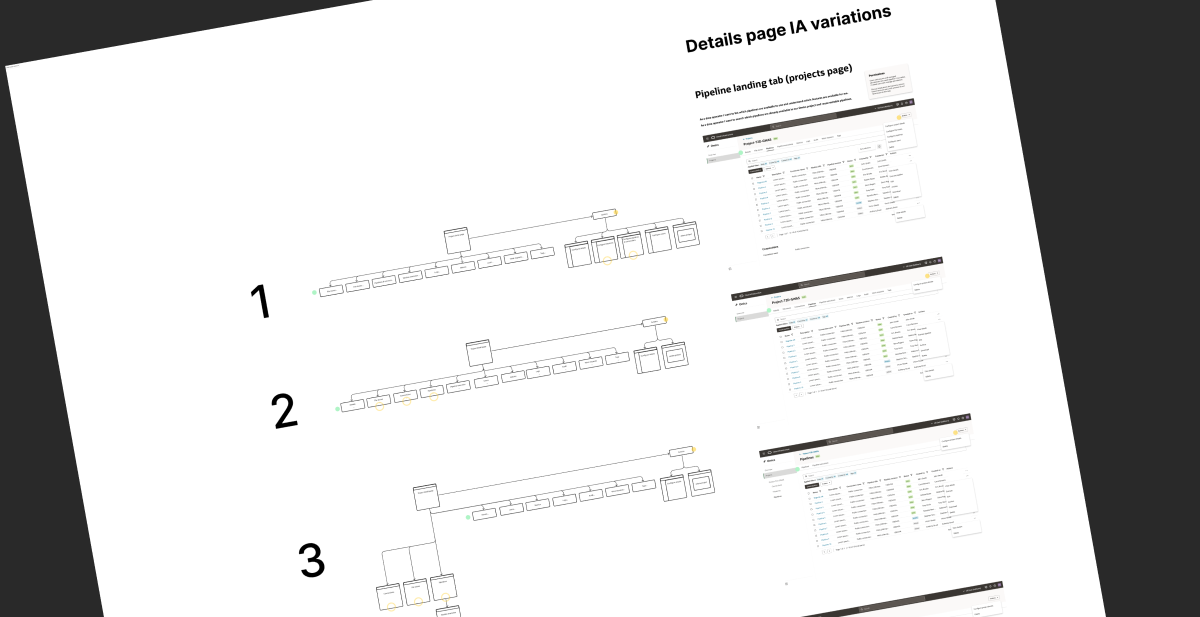
IA variations for a single details page impacting navigation.
I defined comprehensive user flows that mapped out the journey for each use case, considering multiple scenarios. These included main user paths, CRUD operations (Create, Read, Update, Delete), along with edge cases, error states, and validation requirements. This thorough approach ensured we addressed both standard workflows and exceptional situations.
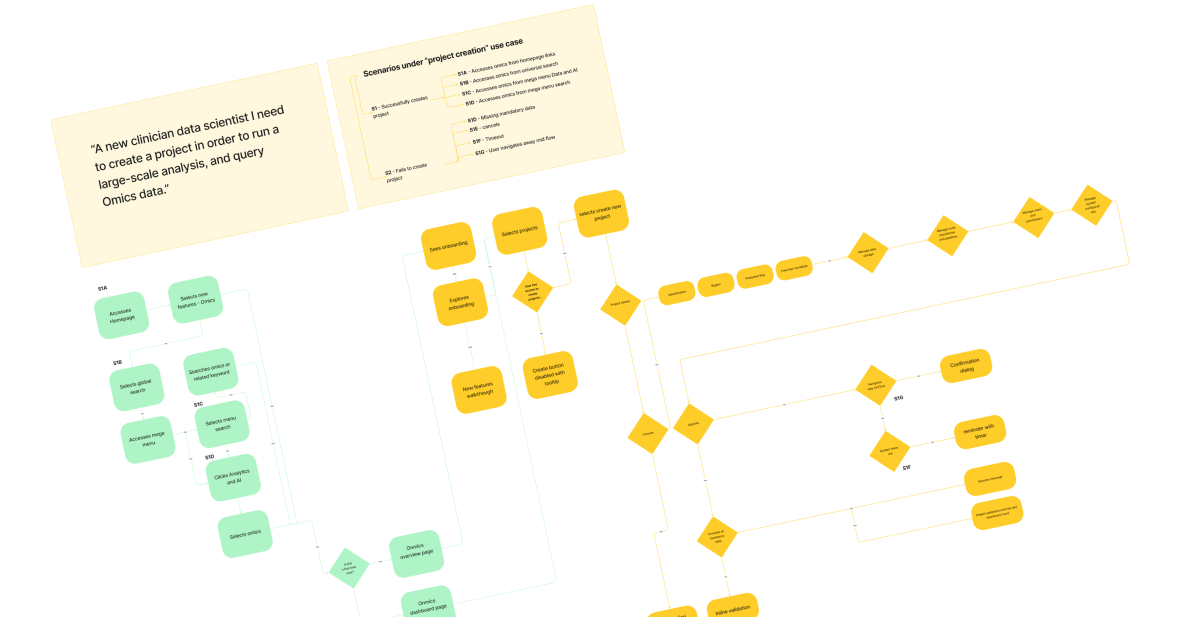
User flow example.
Wireframes, mockups & prototypes
I drafted the first wireframes for main flows and discussed them both online and offline with stakeholders. Subsequent design reviews took place to gather feedback on these initial proposals, resulting in quick changes to the overall navigation and features, including patterns for create flows.
A couple of constraints and user needs made us iterate on the create project flow, originally defined as a 5-step flow.
Turning technical constraints into a better model, not a worse compromise
The clearest example of navigating constraints was the create project flow, originally scoped as a single five-step stepper. Three forces made that untenable:
User experience
The flow was too long to complete in one sitting and forced users out into other parts of the software to finish.
Engineering reality
The backend required saves to be committed partially across steps rather than in bulk, and offered no "save for later," so a clean linear stepper was technically impossible.
Two distinct user scenarios
One where a project manager sets up a shell for others to configure, and one where the creator is also the configurator, each implying a different experience.
Instead of forcing a compromised stepper, I worked with Product and Engineering to reframe the model entirely: a simplified flow that captures only essential identifying data and saves a project "shell," followed by separate, resumable prerequisite steps (users and permissions, advanced project details, file sources, pipeline setup, execution parameters, and connection setup) that could be completed at the user's convenience. This aligned the design to the backend's partial-save behavior and served both user scenarios, converting a technical limitation into a genuinely better mental model.
All of this took us in the direction of splitting the creation into a simple and advanced flow as defined below:
1) In the simplified flow, users would first provide essential identification data.
2) After saving this initial "shell," they could then separately complete other prerequisite steps at their convenience, including:
- Users and permissions configuration
- Advanced project details
- File sources integration
- Pipeline setup
- Execution parameters
- Connection establishment
Mockups
I elevated the initial iterated wireframes to mockups, adhering to the design system language. I collaborated closely with technical writing to ensure the copy held the deep technical nuance of the product while maintaining consistency with our design standards.
.webp)
Project page, missing pre-requisites (project shell version).
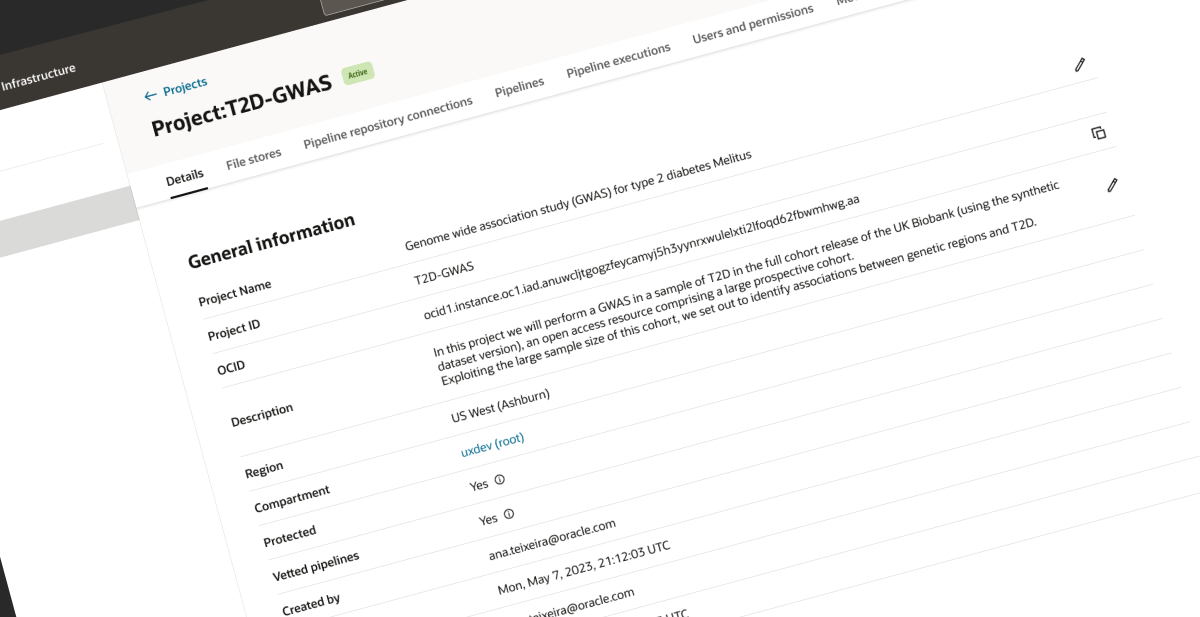
Project page, fully configured.
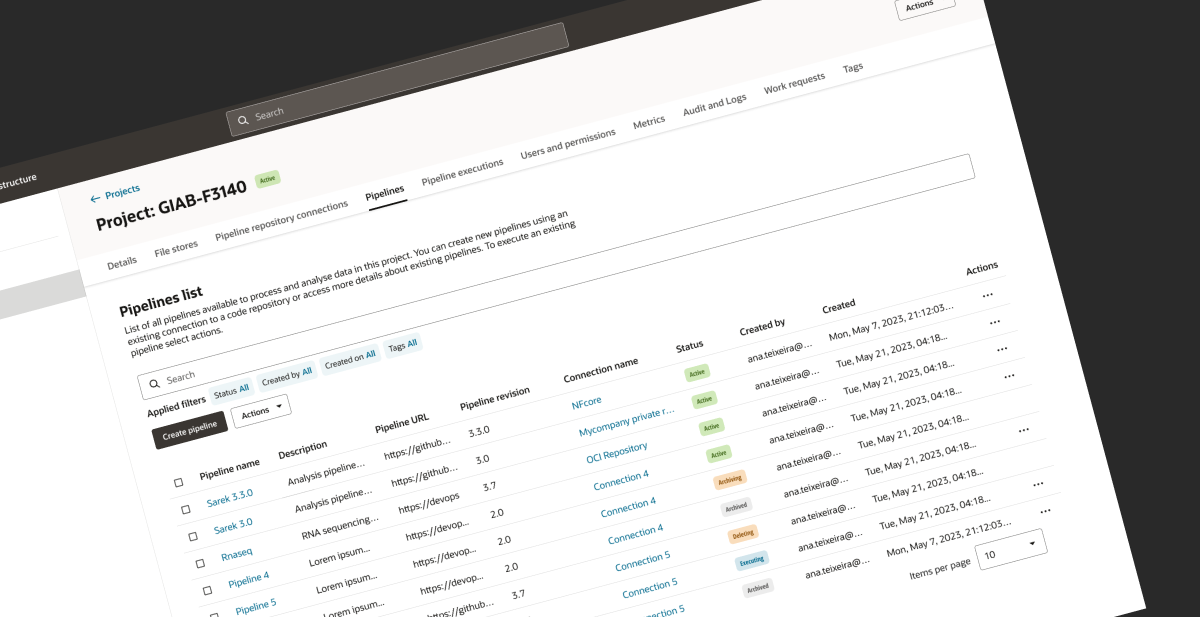
Example of project section, pipelines tab.
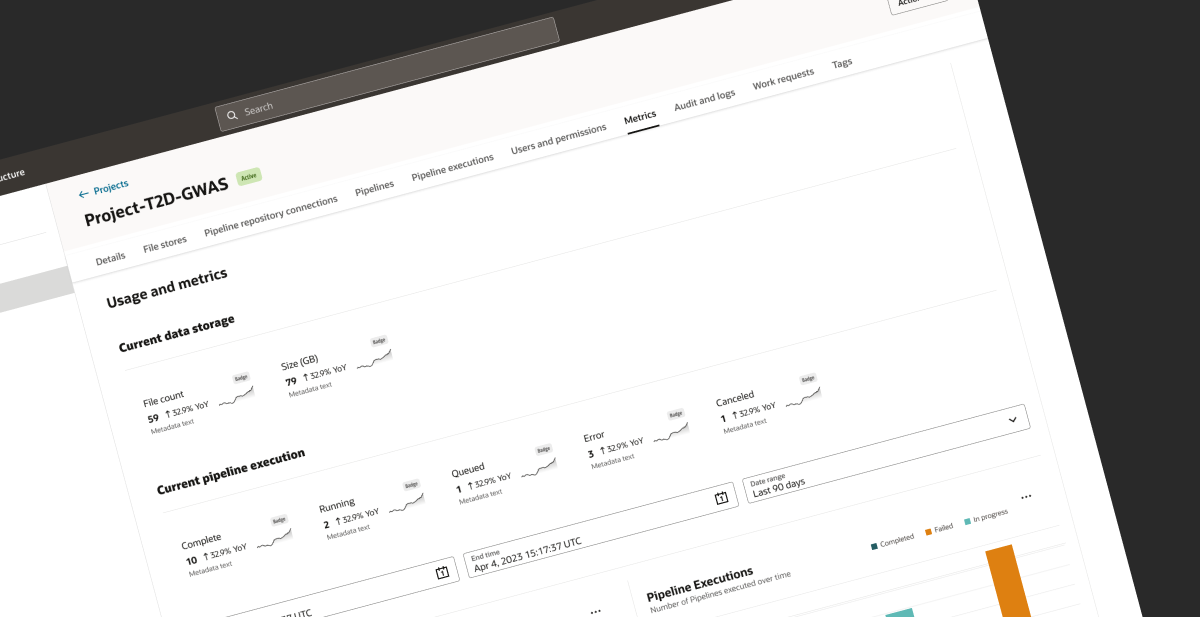
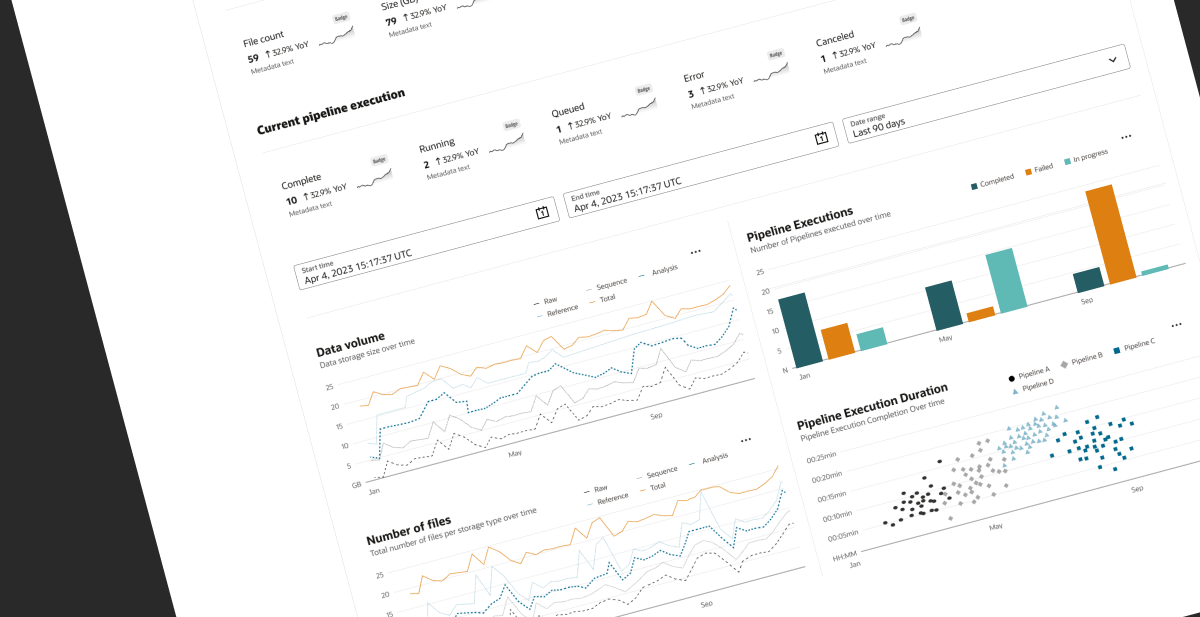
Example of project section, metrics tab.
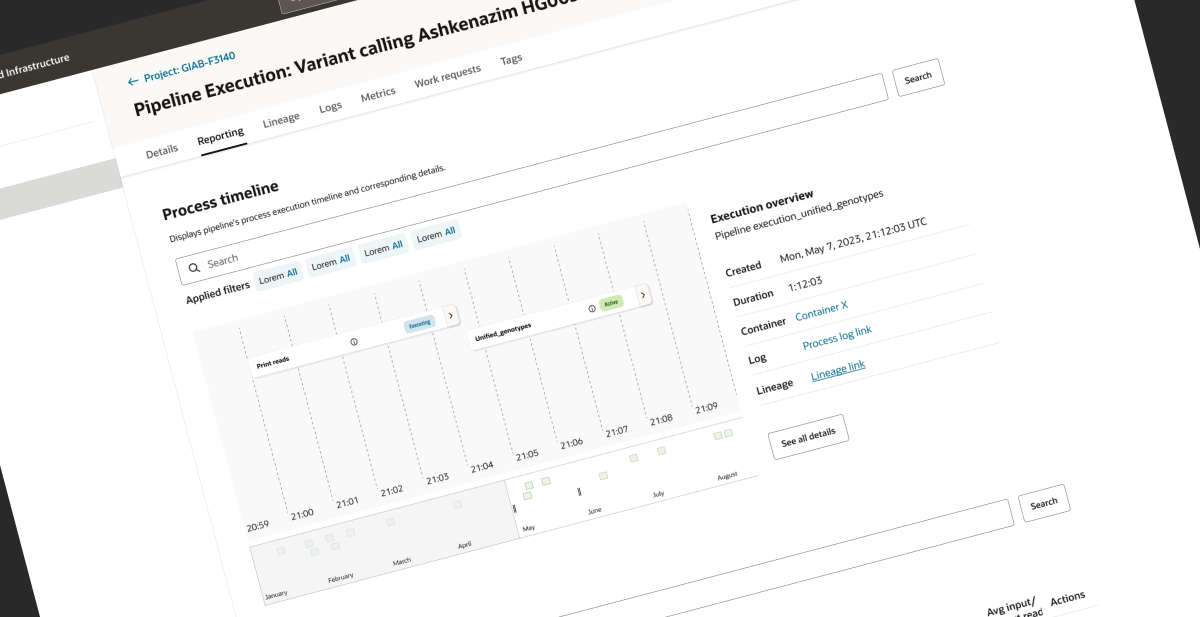
Example of pipeline execution details page, reporting timeline tab.
Prototypes
I prototyped the journeys across different scenarios which helped facilitate design reviews and feedback sessions and was also instrumental for the usability testing studies where we asked participants to test and evaluate the experience.
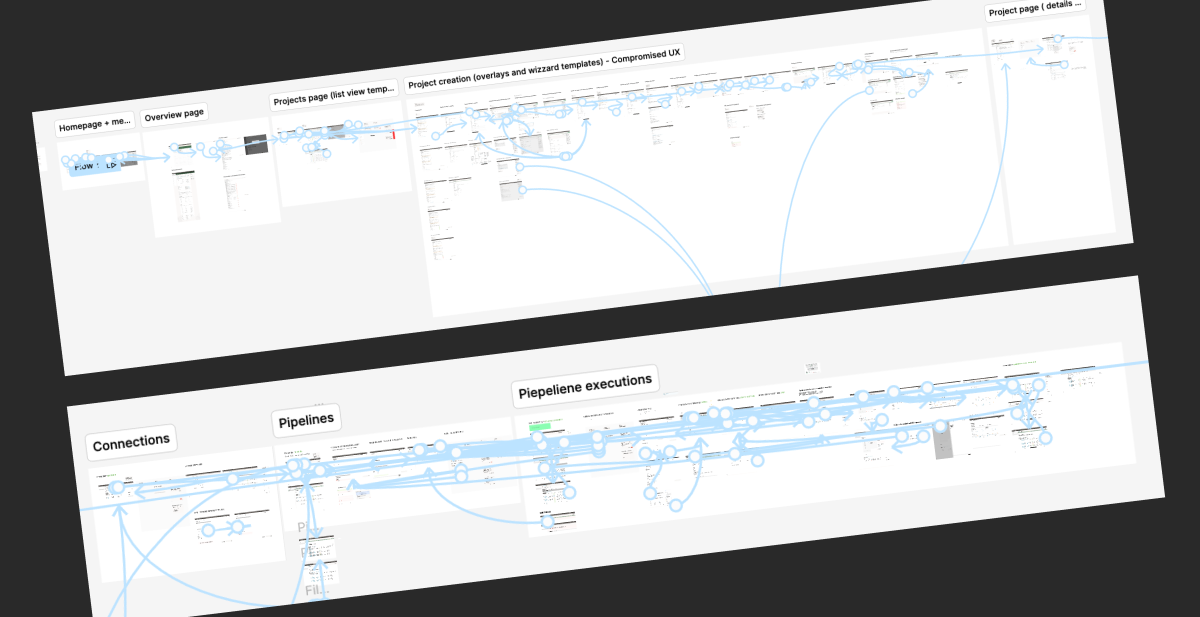
Examples of prototype links connecting flows across creation, pipelines and executions.
Component documentation
I crafted a detailed catalog of component variations that accommodated diverse user scenarios, precisely mapping how menu actions and contextual messages transform across different use cases. This exhaustive documentation wasn't merely included in the prototyped user flows it was strategically centralized in a dedicated component mapping repository, creating a single source of truth that significantly streamlined the implementation process.
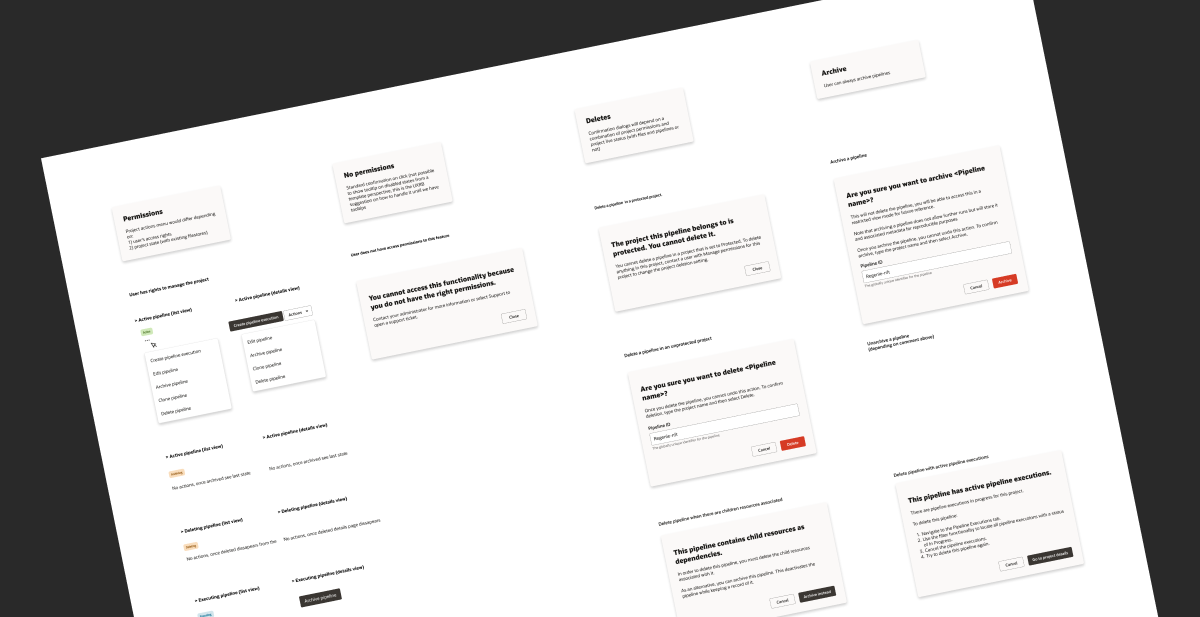
Example of components documentation per scenario
Evaluating concepts with testing, using research as a mentorship engine
To evaluate the solution I orchestrated two testing phases, each engaging five domain experts from our beta client group. I planned the sessions, recruited participants and ran phase 1 (project creation and pipelines), inviting other designers to take notes, reducing bias, and shadow me as a moderator so I could mentor them to run their own studies. I then guided them in running phase 2 (filestores) supporting them through the process.
Results helped refine the two-step shell-and-advanced creation flow, and surfaced technical needs around pipeline definition where users wanted more advanced configuration and settings.
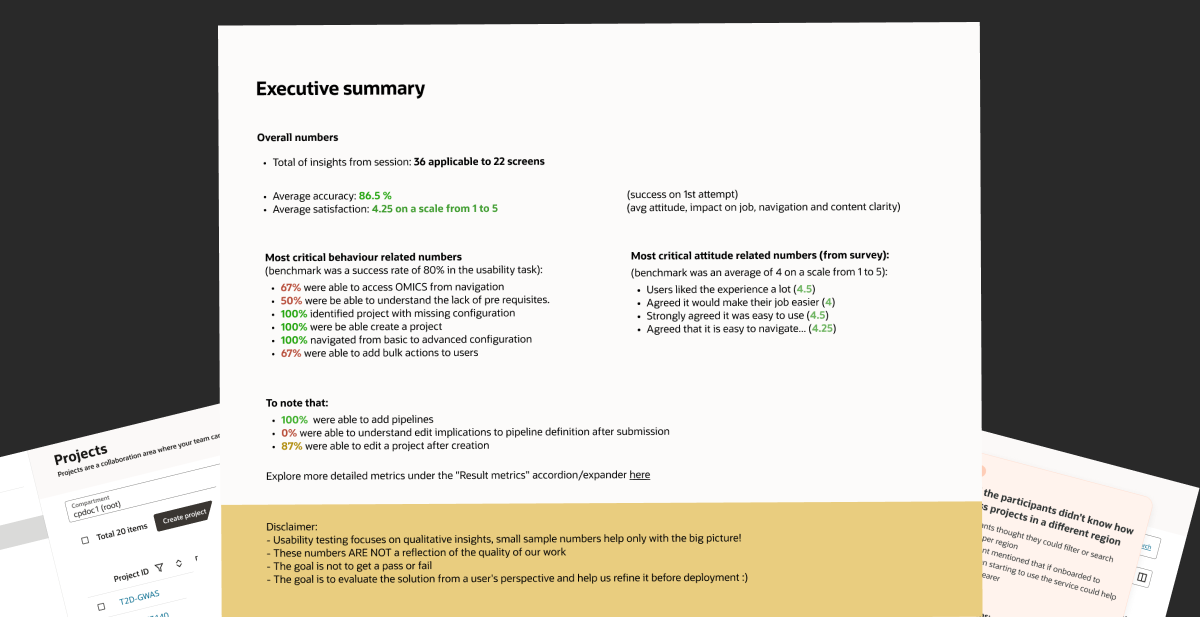
Usability testing study metrics overview.
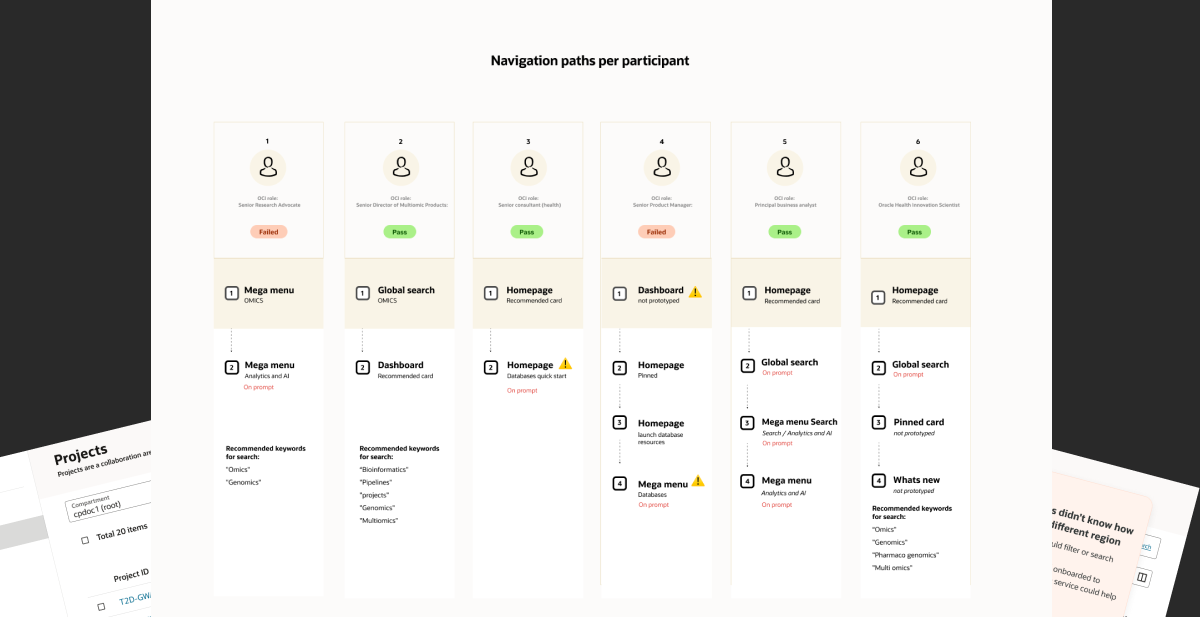
Analysis of individual participant paths to identify how users locate the service.
.webp)
Key findings annotations per screen (representative example).
2.webp)
Key findings annotations per screen (representative example).
Governing trade-offs instead of forgetting them
To protect long-term quality, I established a UX debt tracking system to monitor descoped features and design compromises made during the iterative phases. I logged each instance, from reduced functionality to design inconsistencies, alongside the rationale for deprioritisation, collaborating with cross-functional teams to document impact and tag items with metrics like user severity and business priority.
This informed prioritisation for future sprints and kept these issues visible and actionable in post-launch phases rather than forgotten.
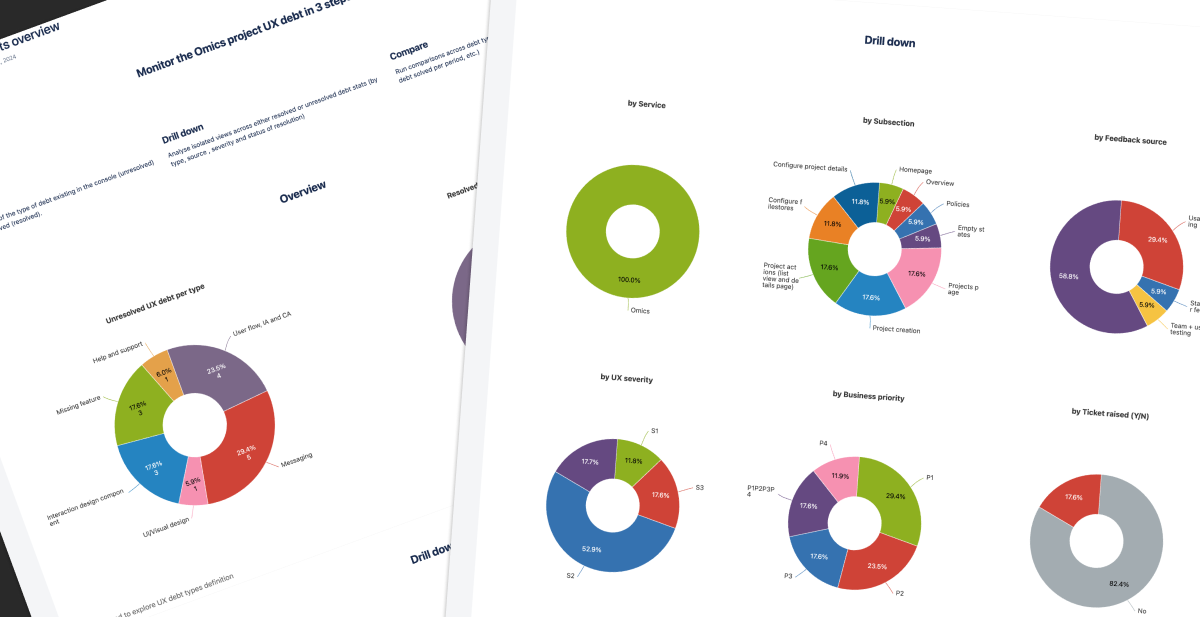
The UX debt log, tracking debt by type, service, severity, business priority and status of resolution.
Onboarding & mentoring designers
As part of onboarding, I mentored incoming designers by walking them through the product and design goals from the ground up. I introduced them to related feature areas and our usability testing practices, and invited them to observe live sessions, building their confidence in note-taking and observation until they could run their own usability studies.
Results & Business Impact
Results & Business Impact
A reproducible, findable data experience
The delivered platform gives researchers reproducible analytical workflows and structured, findable data, data that is no longer siloed and can be reused effectively across teams. This directly serves the business objective of centralizing omics data to reduce sequencing costs and accelerate the translation of research into clinical care.
Task success across core pipeline workflows, above the 80% benchmark.
Average satisfaction, measured before optimisation insights were applied.
Usability research rounds run with beta-client domain experts.
Validated design efficiency
Achieved an 86.5% task success rate (surpassing the 80% benchmark) and a 4.5/5 satisfaction score during usability testing. Crucially, these metrics reflect the pre-optimization baseline, meaning the final shipped experience achieved even higher performance once the surfaced improvements were applied.
Engineered a resilient creation model
Restructured a fragmented five-step flow into a flexible, resumable model (supporting both simple and advanced paths). This design intervention bypassed a rigid backend constraint while accommodating two distinct user personas, dramatically reducing friction and abandonment risk in a core platform flow.
"This was not a clean linear project. The value came from navigating ambiguity, aligning three disciplines with competing constraints, and making defensible trade-offs under real technical limits."
Mitigated implementation risk & accelerated velocity
Established a centralized component mapping repository as the single source of truth. This allowed engineering to implement complex, contextual states with high confidence, speeding up delivery while preserving strict design integrity across the platform.
Operationalized UX debt governance
Transformed informal design compromises into a structured, tagged, and prioritized backlog. This framework secured long-term product quality and provided leadership with clear visibility for post-launch engineering investment and planning.
Drove end-to-end delivery & mentorship
Steered the project from inception to completion, delivering a fully specified system to the technical team. Simultaneously, I scaled the broader design team's research maturity by onboarding and mentoring designers into independent study.
Recommendations
Recommendations
What people say about working with me
“Inês is an exceptional user experience researcher and designer. Her dedication to creating a seamless and intuitive experience coupled with the relentless explorations and optimisation of the use of existing design patterns has not gone unnoticed.I worked with Inês on the development of an interface and user flow for a brand new product to support complex research processes for genomics data processing. Her work was crucial in triggering discussions on the technical implementation and her prototypes made several conversations much easier. Inês did not limit herself to just design a like-to-like user experience based on the product team prototypes, she wanted to understand the user needs and translate that into an interface that not only met the needs but exceeded expectations. Inês would iterate over and over again with feedback from product, from users, from engineers and from her own team, I've never seen Inês frustrated by this. Inês was a quick responder, acting fast with a basis for our work and then iterate over and over until we were all satisfied with the result. We worked at the transition between design systems, Inês embraced the challenge with both arms and always ensured constant feedback back to other teams about challenges or usability findings.Inês led the work without ego and made it truly a co-design experience while putting users at the centre. Inês was always prepared to cover for others and putting additional effort at the cost of her own personal time to drive the work forward. Moreover, the collaborative spirit and professionalism demonstrated throughout the design process have been invaluable for me personally. Inês was always very transparent in her communications and ensured she brought all stakeholders and cards to the table so that the best decisions could be made collaboratively.Inês is an inspiration for me and for the colleagues in her team, she truly cares about her work and doing better everyday.”
“Any software development team fervently hopes for a UX designer like Inês. I was very fortunate to work with her in the early stages of a project, where we were defining and adjusting the UI text for several different workflows. Frequently, our conversations led not only to the best placement of in-application content, but enhancements to the design itself.Inês' superpower is the ability to simultaneously hold deep technical nuance of the product, consistency of design standards, and the ability to improvise, while making it all look effortless. She is a great communicator, and conveys her ideas gently, thoughtfully, and thoroughly. She is also an excellent leader who brings people to her understanding by showing, not just telling.I would relish the opportunity to work with Inês again, and cannot overstate my informed opinion that she would be an incredible asset to any organization.”